The Basics of UX Design — Free Course | The Creators Academy
The Creators Academy

Learn the Basics of
UX Design (Free).

New to UX? In two weeks, learn how real UX Designers think, research and design. Live mentor-led session with AI tools by your side. See if UX is the right career for you before you commit to anything.

Free
No cost, ever
2 Weeks
Live, mentor-led
The Basics of UX Design
Learn fundamentalsUX process, 6 modules
Try AI toolsHands-on, not a demo
Live with a mentorReal feedback, live
Decide with confidenceIs UX right for you?

In 2 Weeks

Take the First Step
Toward a UX Career.

Designed for aspiring UX Designers, this course introduces you to the fundamentals of UX, from user research and problem-solving to wireframing and AI-assisted design, giving you the clarity to decide whether this career is right for you.

Course Starts
Coming soon
30
Seats Left
4+
Live Sessions
Program PriceFree
UX fundamentalsWireframingDesign thinkingAI design toolsVisual design introMentor feedbackUX fundamentalsWireframingDesign thinkingAI design toolsVisual design introMentor feedback

Your mentor's track record — mentees now work at

Jio
PwC
BrowserStack
Procol
Oliv
Tutorials aren't enough

Watching UX tutorials
isn't the same as designing.

There's no shortage of free UX content online, the problem is the structure. Without a real process to follow and someone to tell you if your thinking is actually sound, most beginners stall out with a folder of half-finished tutorials and no clearer idea if UX is right for them. This course will help you clearly understand What UX Design is? and How to become a UX Designer?

Why two weeks matters

The Difference Structure & Feedback Actually Make

The Basics of UX Design Certified

Two weeks in a real cohort, with a real mentor.

Understands the real UX process — research through to design.

Has actually tried AI design tools, not just watched a demo.

Knows, with evidence, whether UX is a career worth pursuing.

Has a clear, informed next step — free or paid.

Knows where they stand

The Tutorial-Hopper

Don't stay stuck here.

Watches dozens of "Figma tutorial" videos and builds nothing real.

Still can't explain what UX actually means in an interview.

Jumps between free resources with no structure or feedback.

Has no real idea if they're even good at this.

Stuck guessing
Meet your mentor

Learn from someone who's actually shipped.

Bikash Joshi
Lead Mentor

Bikash Joshi

Product Leader & UX Practitioner

Bikash is a Product Leader and UX Practitioner with 12+ years of experience building digital products, leading cross-functional teams and mentoring aspiring Product Managers and Designers. Having mentored 100+ professionals, he helps learners bridge the gap between theory and real-world execution through practical projects, portfolio reviews and career guidance.

Highlights

12+ years of product-building experience
100+ mentees across Product & Design
Product leader, designer and builder

Worked With

dMACQJioMcKinseyIntegreonMTS

Products Built & Led

What Bikash's mentees say

He's done this before. People remember.

Photo
Navin Mishra
Navin Mishra
LinkedIn
Jio
Mentored by Bikash Joshi

I had the opportunity to work with Bikash for over three years, and he played a key role in shaping my growth as a designer. His mentorship went beyond design reviews—he taught me how to think critically, solve the right problems, and always put users first. The lessons I learned from him continue to influence my work today.

Photo
Mayank Parab
Mayank Parab
LinkedIn
Senior Product Designer
BrowserStack
Mentored by Bikash Joshi

Bikash didn't just mentor me in building products, he helped shape how I think. He encouraged me to look beyond execution, understand the real problem, and stay grounded in the user's perspective. That shift continues to influence how I approach decisions and solve problems.

Photo
Ashraf Shaikh
Ashraf Shaikh
LinkedIn
UX Designer
PwC
Mentored by Bikash Joshi

Bikash helped me stop designing screens and start solving real problems. His guidance transformed my portfolio and boosted my confidence during interviews.

Photo
Shravan Tiwari
Shravan Tiwari
LinkedIn
Procol
Mentored by Bikash Joshi

Bikash pushed me to think beyond the screen — questioning assumptions, grounding decisions in real user insight, and defending design choices with clear reasoning, not just taste. That shift in how I approach problems has stayed with me well beyond our sessions together.

Photo
Divyansh Pandey
Divyansh Pandey
LinkedIn
Product & Web Designer
Oliv
Mentored by Bikash Joshi

Bikash bridges the gap between theory and real-world practice. His feedback improved my portfolio, sharpened my thinking, and gave me the confidence to succeed in interviews.

Photo
Navin Mishra
Navin Mishra
LinkedIn
Jio
Mentored by Bikash Joshi

I had the opportunity to work with Bikash for over three years, and he played a key role in shaping my growth as a designer. His mentorship went beyond design reviews—he taught me how to think critically, solve the right problems, and always put users first. The lessons I learned from him continue to influence my work today.

Photo
Mayank Parab
Mayank Parab
LinkedIn
Senior Product Designer
BrowserStack
Mentored by Bikash Joshi

Bikash didn't just mentor me in building products, he helped shape how I think. He encouraged me to look beyond execution, understand the real problem, and stay grounded in the user's perspective. That shift continues to influence how I approach decisions and solve problems.

Photo
Ashraf Shaikh
Ashraf Shaikh
LinkedIn
UX Designer
PwC
Mentored by Bikash Joshi

Bikash helped me stop designing screens and start solving real problems. His guidance transformed my portfolio and boosted my confidence during interviews.

Photo
Shravan Tiwari
Shravan Tiwari
LinkedIn
Procol
Mentored by Bikash Joshi

Bikash pushed me to think beyond the screen — questioning assumptions, grounding decisions in real user insight, and defending design choices with clear reasoning, not just taste. That shift in how I approach problems has stayed with me well beyond our sessions together.

Photo
Divyansh Pandey
Divyansh Pandey
LinkedIn
Product & Web Designer
Oliv
Mentored by Bikash Joshi

Bikash bridges the gap between theory and real-world practice. His feedback improved my portfolio, sharpened my thinking, and gave me the confidence to succeed in interviews.

Tools you'll try

A taste of the AI-first toolkit.

The exact tools you'd use on day one of the full AI-Driven UX Designer program — hands-on, not just watched.

Figma
ChatGPT
Claude
Wireframing
Figma — your first screens, low-fi to clickable.
AI-assisted research & ideation
ChatGPT / Claude — used hands-on for real design thinking, not just a demo.
Rapid prototyping
Turn an idea into a clickable first draft, fast.
What you'll learn

Course Curriculum

What is Design vs UX Design — definitions, and good vs bad UX examples
Roles in UX (Researcher, UX Designer, UI Designer, Interaction Designer)
Why UX matters — a quick map of the whole field
FoundationsUX vs UIRoles
Design Thinking (Empathize, Define, Ideate, Prototype, Test)
The Double Diamond, at a glance
How AI compresses each stage of the process
Design ThinkingProcess
A first look at how mental models and cognitive load shape design decisions
A handful of the most useful UX Laws (Hick's, Fitts's, Jakob's)
Why "it looks nice" isn't the same as "it works"
PsychologyUX Laws
Low-fidelity wireframing basics in Figma
Structuring a screen before you touch visual design
Common beginner mistakes and how to avoid them
WireframingFigma
Using ChatGPT / Claude for research synthesis and ideation
Where AI genuinely speeds you up — and where it doesn't
A first hands-on AI-assisted design exercise
AI ToolsHands-on
A small, self-contained design exercise — start to finish
Live review with your mentor
What's Next
Mini UX ProjectFeedback
Your credential

Earn your certificate of completion.

Finish the two weeks — live sessions, Q&A and your mini project — and get a certificate that says you did. We keep the claim modest: completion of the basics, not a job-ready portfolio. That's what the full program is for.
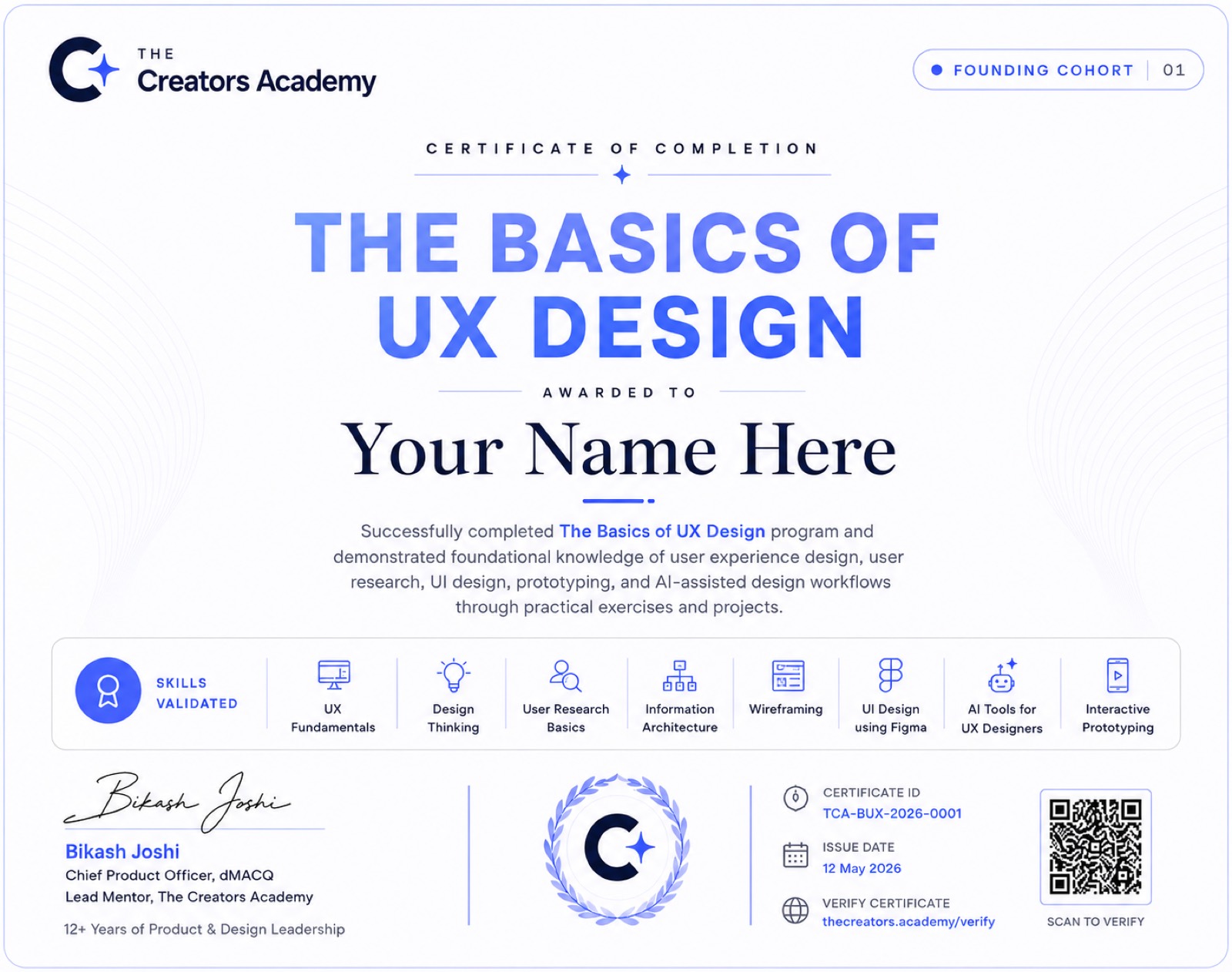
Awarded for completing the 2-week program
Signed by your mentor
Shareable on LinkedIn and your profile
The Basics of UX Design Certificate
How your two weeks lookTentative

Light on your calendar, on purpose.

One live session and one mini project. Around 4–6 hours a week, total.

Live session
Core concept + walkthrough
Sat & Sun·3:00–5:00 PM IST
Learn core UX concept, live
See how it applies to a real design problem
Learn how AI is changing UX
Mini UX Project
Light, hands-on practice
Due at the end of week 2·Async
A short, focused exercise — not a big project
Apply what you just learned
Live Demo of UX Project to the Mentor

Provisional schedule — final times confirmed with enrolled members before start.

What you'll walk away with

Not a job. A real head start.

Two weeks won't make you job-ready — and we won't pretend it will. What it will do is give you the real fundamentals and enough evidence to know if UX is worth pursuing further.

Real UX fundamentals

The actual process — research through to design — not just tool tricks.

Hands-on with AI tools

You'll have used them yourself, not just watched a demo.

A completion certificate

Proof you finished, shareable on LinkedIn.

Honest fit

Is this free course for you?

This is for people who aren't sure yet — and want real evidence before deciding, not another 40-minute YouTube video.

Complete beginners
who've never designed anything and want to try it, risk-free
The UX-curious
testing whether design is the right move before committing time or money
Students
exploring UX as a path before choosing a specialisation
Career switchers
who want a low-risk first step before the full program
Adjacent creatives
marketers, writers and visual designers curious about UX
Future AI-Driven Designers
who want a taste of the AI-first workflow before going all in
No catch

This course is completely free.

No card, no hidden fee, no pressure to buy anything afterwards. We built this because most people can't tell if UX is right for them until they've actually tried it.

What's included, free
Live, mentor-led sessions
A mini project with mentor feedback
Certificate of completion
Program price
Free
For the full 2 weeks — no payment at any point

Loved it? The full AI-Driven UX Designer program is next.

Ready to go further?
This is a taste. The real thing is 12 weeks.
Once you've tried the basics, the AI-Driven UX Designer program takes you all the way — research, ideation, prototyping, testing and a shipped, portfolio-ready case study, with the same mentor.
FAQs

Good to know

Yes — completely. No card required to enrol, and nothing to pay at any point during the two weeks.

None. We built this because most people can't tell if UX is right for them from a video alone. If you like it, the paid AI-Driven UX Designer program is there — but there's no pressure and no obligation.

Yes — a certificate of completion once you finish the program, signed by your mentor and shareable on LinkedIn.

Honestly, no — and we won't claim otherwise. This is a real foundation, not a job-ready portfolio. The full 12-week AI-Driven UX Designer program is where that happens.

You can apply to the AI-Driven UX Designer program, or simply walk away with what you learned. Either way, no pressure.

No. This program is designed for complete beginners — no design, tech or coding background required.

No. Coding isn't required for UX Design, in this course or the full program.

Just a laptop and a free Figma account. We'll point you to everything else during the course.

A core session every Saturday and Sunday. Sessions are live, we are built around real interaction, not recordings.

Yes — the schedule (roughly 4–6 hours a week) is designed to fit around a full-time job.

Seats are limited each cohort so mentor feedback stays meaningful — check the live seat count above.

No. It's a condensed, honest taste of the fundamentals. The full program goes far deeper — 12 weeks, a complete design process, a shipped capstone case study, and career support.